AI WorkDeck · Édition Communauté

Less switching. More doing.

L'espace de travail IA pour les avocats et les professionnels des documents. Documents, conversations et recherches, tout au même endroit.

Aucune installation requise · Aperçu web

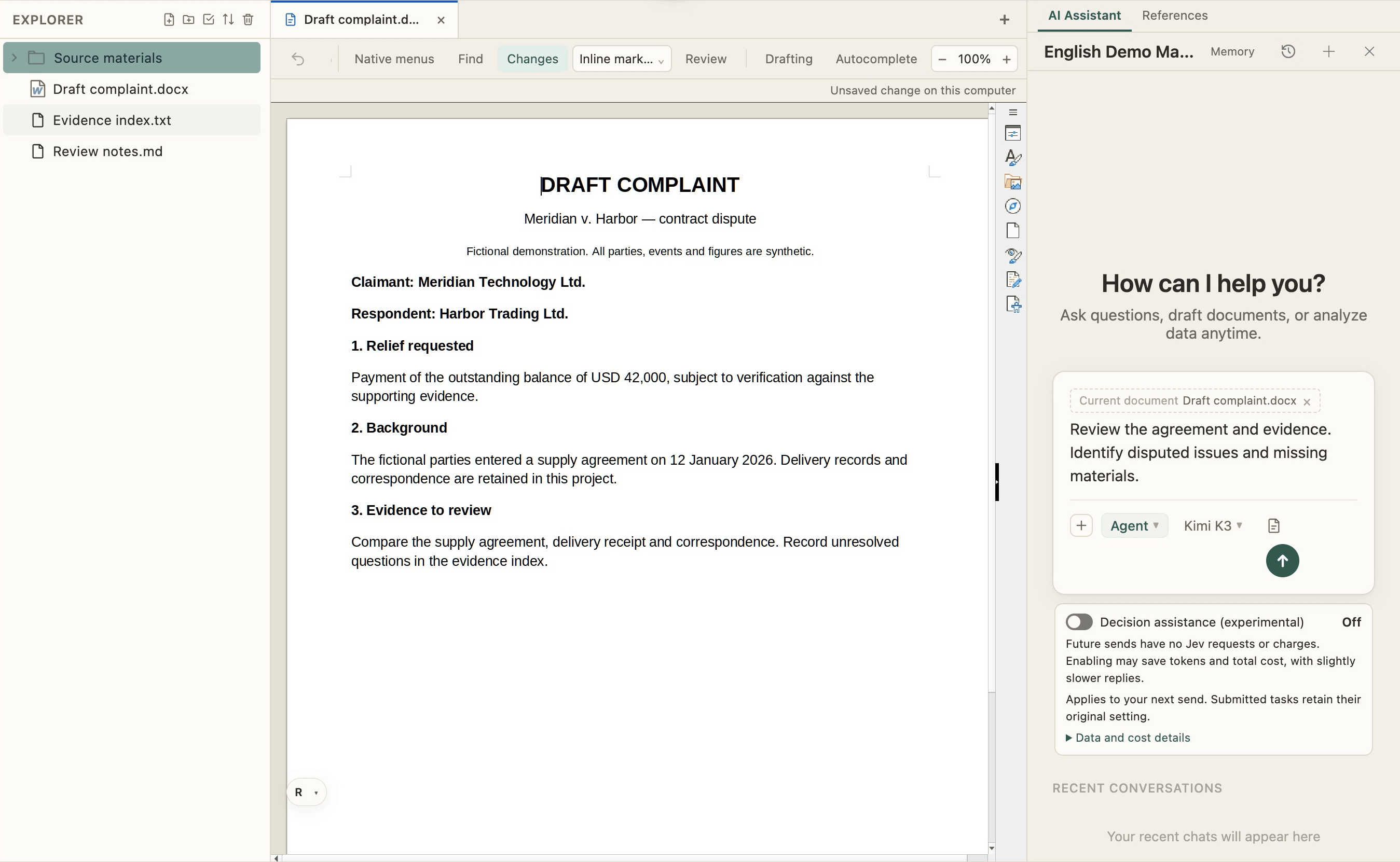
AI WorkDeck Community Edition demonstration: project files, document editing and the AI assistant, side by side in one workspace

01 / EVERY SOURCE, CLOSE AT HAND

One file opensa whole project.

Documents, slides, PDFs, images and audio belong together. Browse, preview and manage your project from the folders on the left.

Open a folder → Select a source → Preview in place

Next, move naturally into editing
Explorateur — AI WorkDeck sample project

02 / FROM READING TO WRITING

Familiar writing.All the context.

Edit, format and review documents in the middle, just as you would in Word. Your source files stay within reach as the next draft takes shape.

Write and format · Track changes · Review

Bring the AI on your right into the work

Document editor — AI WorkDeck sample project

03 / PUT YOUR CONTEXT TO WORK

From a conversationto a changed file.

Demandez à l'IA de réviser le document ouvert à l'aide des documents du projet, ou organisez le dossier à gauche. La conversation, les sources et les résultats partagent un même espace de travail.

« Révisez ce paragraphe en vous basant sur le contrat, puis listez les éléments manquants. »

Il y a plus à explorer, lancez-vous

AI collaboration — AI WorkDeck sample project

EXPLORER AI WORKDECK

D'autres possibilités, à votre gauche.

Recherche, rédaction, plugins et Skills, avec les favoris et le presse-papiers à portée de main.

En savoir plus
Windows · macOS · Open-source community editionView source29 community skills

ARTICLES

See it on real matters

We write product walkthroughs and notes on our WeChat Official Account. Each card opens the full article on WeChat.

Tarifs

Simple, Transparent Pricing

CNY 149/month for AI allowance, clipboard, staging and 3GB cloud storage.

Sign up and get ¥20 in sign-up credits

Master Your Documents. Master Your Future.

Download, install, sign in — two steps and you are working.